Working with Programs
In Brush, a Program is an executable data structure.
You may think of it as a model or a function mapping feature inputs to data labels.
We call them programs because that’s what they are: executable data structures,
and that is what they are called in the genetic algorithm literature, to distinguish them from optimizing bits or strings.
The Brush Program class operates similarly to a sklearn estimator: it has fit and predict methods that are called in during training or inference, respectively.
Types of Programs
There are four fundamental “types” of Brush programs:
Regressors: map inputs to a continous endpoint
Binary Classifiers: map inputs to a binary endpoint, as well as a continuous value in \([0, 1]\)
Multi-class Classifiers: map inputs to a category
Under development
Representors: map inputs to a lower dimensional space.
Under development
Representation
Internally, the programs are represented as syntax trees. We use the tree.hh tree class which gives trees an STL-like feel.
Generation
We generate random programs using Sean Luke’s PTC2 algorithm.
Evaluation
TODO
Visualizing Programs
Programs in Brush are symbolic tree structures, and can be viewed in a few ways:
As a string using
get_model()As a string-like tree using
get_model("tree")As a graph using
graphvizandget_model("dot").
Let’s look at a regresion example.
import pandas as pd
from pybrush import BrushRegressor

# load data
df = pd.read_csv('../examples/datasets/d_enc.csv')
X = df.drop(columns='label')
y = df['label']

X.info() # we have several float and two integer features
<class 'pandas.core.frame.DataFrame'>
RangeIndex: 768 entries, 0 to 767
Data columns (total 8 columns):
 #   Column  Non-Null Count  Dtype
---  ------  --------------  -----
 0   x0      768 non-null    float64
 1   x1      768 non-null    float64
 2   x2      768 non-null    float64
 3   x3      768 non-null    float64
 4   x4      768 non-null    float64
 5   x5      768 non-null    int64
 6   x6      768 non-null    float64
 7   x7      768 non-null    int64
dtypes: float64(6), int64(2)
memory usage: 48.1 KB
# import and make a regressor
est = BrushRegressor(
    # Uncomment the line below to constrain the search space to fewer functions
    functions=['SplitBest', 'SplitOn', 'Geq', 'Eq', 'Mul', 'Add', 'Cos', 'Exp'],
    max_depth=3,
    verbosity=1 # set verbosity==1 to see a progress bar
)

# use like you would a sklearn regressor
est.fit(X,y)

print("Best model:", est.best_estimator_.get_model("tree"))

y_pred = est.predict(X)
print('score:', est.score(X,y))
Completed 100% [====================]
Best model: If(x0>=0.76)
|- If(x0>=0.82)
|  |- 29.83
|  |- 48.74*x0
|- 1.36*Add
|  |- 0.01*x1
|  |- 8.16*x6
score: 0.8950117552104557
You can see the fitness of the final individual by accessing the fitness attribute. Each fitness value corresponds to the objective of same index defined earlier for the BrushRegressor class. By default, it will try to minimize "scorer" and "size", where scorer is a string with a loss function name, set with scorer parameter.
print(est.best_estimator_.fitness)
print(est.objectives)
Fitness(10.703141 34.000000 )
['scorer', 'linear_complexity']
A fitness in Brush is actually more than a tuple. It is a class that has all boolean comparison operators overloaded to allow an ease of use when prototyping with Brush.
It also infers the weight of each objective to automatically handle minimization or maximization objetives.
To see the weights, you can try:
est.best_estimator_.fitness.weights
[-1.0, -1.0]
Other information of the best estimator can also be accessed through its fitness attribute:
print(est.best_estimator_.fitness.size)
print(est.best_estimator_.fitness.complexity)
print(est.best_estimator_.fitness.depth)
25
250
3
Serialization
Brush let’s you serialize the entire individual, or just the program or fitness it wraps. It uses JSON to serialize the objects, and this is implemented with the get and set states of an object:
estimator_dict = est.best_estimator_.__getstate__()

for k, v in estimator_dict.items():
    print(k, v)
fitness {'complexity': 250, 'crowding_dist': 3.4028234663852886e+38, 'dcounter': 0, 'depth': 3, 'dominated': [], 'linear_complexity': 34, 'loss': 9.187416076660156, 'loss_v': 10.703141212463379, 'prev_complexity': 250, 'prev_depth': 3, 'prev_linear_complexity': 34, 'prev_loss': 9.187414169311523, 'prev_loss_v': 10.703254699707031, 'prev_size': 25, 'rank': 1, 'size': 25, 'values': [10.703141212463379, 34.0], 'weights': [-1.0, -1.0], 'wvalues': [-10.703141212463379, -34.0]}
id 291
is_fitted_ False
objectives ['mse', 'linear_complexity']
parent_id [274]
program {'Tree': [{'W': 0.7599999904632568, 'arg_types': ['ArrayF', 'ArrayF'], 'center_op': True, 'feature': 'x0', 'feature_type': 'ArrayI', 'is_weighted': True, 'name': 'SplitBest', 'node_is_fixed': False, 'node_type': 'SplitBest', 'prob_change': 1.0, 'ret_type': 'ArrayF', 'sig_dual_hash': 14679000877885575597, 'sig_hash': 14400282083458657357, 'weight_is_fixed': False}, {'W': 0.8199999928474426, 'arg_types': ['ArrayF', 'ArrayF'], 'center_op': True, 'feature': 'x0', 'feature_type': 'ArrayI', 'is_weighted': True, 'name': 'SplitBest', 'node_is_fixed': False, 'node_type': 'SplitBest', 'prob_change': 1.0, 'ret_type': 'ArrayF', 'sig_dual_hash': 14679000877885575597, 'sig_hash': 14400282083458657357, 'weight_is_fixed': False}, {'W': 29.8331241607666, 'arg_types': [], 'center_op': True, 'feature': 'constF', 'feature_type': 'ArrayF', 'is_weighted': True, 'name': 'Constant', 'node_is_fixed': False, 'node_type': 'Constant', 'prob_change': 0.6167147755622864, 'ret_type': 'ArrayF', 'sig_dual_hash': 7018942542468397869, 'sig_hash': 14162902253047951597, 'weight_is_fixed': False}, {'W': 48.73774337768555, 'arg_types': [], 'center_op': True, 'feature': 'x0', 'feature_type': 'ArrayF', 'is_weighted': True, 'name': 'Terminal', 'node_is_fixed': False, 'node_type': 'Terminal', 'prob_change': 0.6343384981155396, 'ret_type': 'ArrayF', 'sig_dual_hash': 7018942542468397869, 'sig_hash': 14162902253047951597, 'weight_is_fixed': False}, {'W': 1.3606120347976685, 'arg_types': ['ArrayF', 'ArrayF'], 'center_op': True, 'feature': '', 'feature_type': 'ArrayF', 'is_weighted': True, 'name': 'Add', 'node_is_fixed': False, 'node_type': 'Add', 'prob_change': 1.0, 'ret_type': 'ArrayF', 'sig_dual_hash': 14679000877885575597, 'sig_hash': 14400282083458657357, 'weight_is_fixed': False}, {'W': 0.013320915400981903, 'arg_types': [], 'center_op': True, 'feature': 'x1', 'feature_type': 'ArrayF', 'is_weighted': True, 'name': 'Terminal', 'node_is_fixed': False, 'node_type': 'Terminal', 'prob_change': 0.6729995608329773, 'ret_type': 'ArrayF', 'sig_dual_hash': 7018942542468397869, 'sig_hash': 14162902253047951597, 'weight_is_fixed': False}, {'W': 8.156413078308105, 'arg_types': [], 'center_op': True, 'feature': 'x6', 'feature_type': 'ArrayF', 'is_weighted': True, 'name': 'Terminal', 'node_is_fixed': False, 'node_type': 'Terminal', 'prob_change': 0.20750471949577332, 'ret_type': 'ArrayF', 'sig_dual_hash': 7018942542468397869, 'sig_hash': 14162902253047951597, 'weight_is_fixed': False}], 'is_fitted_': True}
variation insert
With serialization, you can use pickle to save and load just programs or even the entire individual.
import pickle
import os, tempfile

individual_file = os.path.join(tempfile.mkdtemp(), 'individual.json')
with open(individual_file, "wb") as f:
    pickle.dump(est.best_estimator_, f)

program_file = os.path.join(tempfile.mkdtemp(), 'program.json')
with open(program_file, "wb") as f:
    pickle.dump(est.best_estimator_.program, f)
Then we can load it later with:
with open(individual_file, "rb") as f:
    loaded_estimator = pickle.load(f)
    print(loaded_estimator.get_model())
If(x0>=0.76,If(x0>=0.82,29.83,48.74*x0),1.36*Add(0.01*x1,8.16*x6))
String
Now that we have trained a model, est.best_estimator_ contains our symbolic model.
We can view it as a string:
print(est.best_estimator_.get_model())
If(x0>=0.76,If(x0>=0.82,29.83,48.74*x0),1.36*Add(0.01*x1,8.16*x6))
Quick Little Tree
Or, we can view it as a compact tree:
print(est.best_estimator_.get_model("tree"))
If(x0>=0.76)
|- If(x0>=0.82)
|  |- 29.83
|  |- 48.74*x0
|- 1.36*Add
|  |- 0.01*x1
|  |- 8.16*x6
GraphViz
If we are feeling fancy 🎩, we can also view it as a graph in dot format. Let’s import graphviz and make a nicer plot.
import graphviz

model = est.best_estimator_.get_model("dot")
graphviz.Source(model)
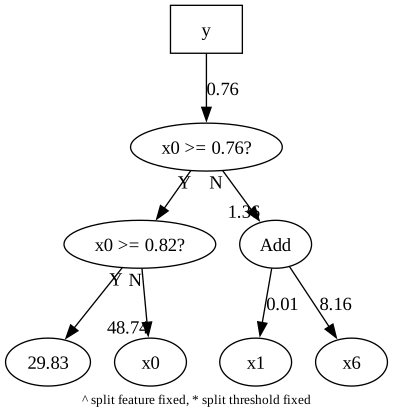
The model variable is now a little program in the dot language, which we can inspect directly.
print(model)
digraph G {
y [shape=box];
y -> "177604080" [label="0.76"];
"177604080" [label="x0 >= 0.76?"];
"177604080" -> "10fd43150" [headlabel="",taillabel="Y"];
"177604080" -> "17359a090" [headlabel="1.36",taillabel="N"];
"10fd43150" [label="x0 >= 0.82?"];
"10fd43150" -> "109926ea0" [headlabel="",taillabel="Y"];
"10fd43150" -> "x0" [headlabel="48.74",taillabel="N"];
"109926ea0" [label="29.83"];
"x0" [label="x0"];
"17359a090" [label="Add"];
"17359a090" -> "x1" [label="0.01"];
"17359a090" -> "x6" [label="8.16"];
"x1" [label="x1"];
"x6" [label="x6"];
label="^ split feature fixed, * split threshold fixed";
labelloc=bottom;
fontsize=10;}
Tweaking Graphs
The dot manual has lots of options for tweaking the graphs.
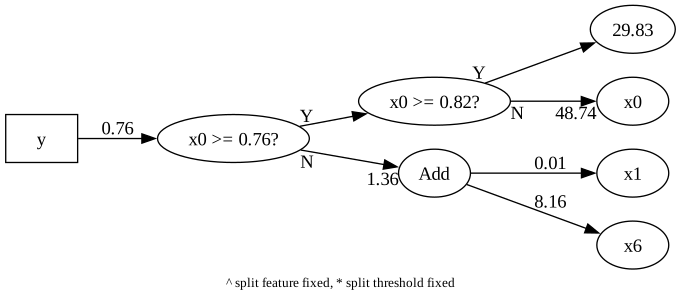
You can do this by manually editing model, but brush also provides a function, get_dot_model(), to which you can pass additional arguments to dot.
For example, let’s view the graph from Left-to-Right:
model = est.best_estimator_.get_dot_model("rankdir=LR;")
graphviz.Source(model)
A classification example
from pybrush import BrushClassifier
from sklearn.preprocessing import StandardScaler

# load data
df = pd.read_csv('../examples/datasets/d_analcatdata_aids.csv')
X = df.drop(columns='target')
y = df['target']

X.info()
<class 'pandas.core.frame.DataFrame'>
RangeIndex: 50 entries, 0 to 49
Data columns (total 4 columns):
 #   Column  Non-Null Count  Dtype
---  ------  --------------  -----
 0   Age     50 non-null     int64
 1   Race    50 non-null     int64
 2   AIDS    50 non-null     float64
 3   Total   50 non-null     float64
dtypes: float64(2), int64(2)
memory usage: 1.7 KB
est = BrushClassifier(
    # Uncomment the line below to constrain the search space to fewer functions
    functions=['SplitBest', 'SplitOn', 'Geq', 'Eq', 'Mul', 'Add', 'Cos', 'Exp'],
    max_gens=100,
    max_size=50,
    max_depth=5,
    objectives=["scorer", "linear_complexity"],
    scorer="average_precision_score",
    pop_size=100,
    bandit='dynamic_thompson',
    verbosity=1
)

est.fit(X,y)

print("Best model:", est.best_estimator_.get_model("tree"))
Completed 100% [====================]
Best model: Logistic
|- -0.38+Add
|  |- 0.00*Add
|  |  |- Cos
|  |  |  |- AIDS
|  |  |- 0.01*AIDS
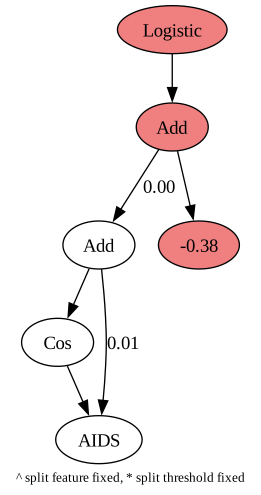
Notice that classification problems have a fixed logistic root on their programs. When printing the dot model, Brush will highlight fixed nodes using a light coral color.
est.engine_.search_space.print()

print("Best model:", est.best_estimator_.get_model())
print('score:', est.score(X,y))

print("Best model:", est.best_estimator_.get_model("tree"))

model = est.best_estimator_.get_dot_model()
graphviz.Source(model)
=== Search space ===
terminal_map: {"ArrayB": ["1.00"], "ArrayI": ["Age", "Race", "1.00"], "ArrayF": ["AIDS", "Total", "1.00"]}
terminal_weights: {"ArrayB": [0.3165285], "ArrayI": [0.5779346, 0.42670068, 0.10736023], "ArrayF": [0.539658, 0.18103841, 0.7904958]}
SplitBest node_map[ArrayI][["ArrayI", "ArrayI"]][SplitBest] = SplitBest, weight = 0.5382333
Mul node_map[ArrayI][["ArrayI", "ArrayI"]][Mul] = Mul, weight = 0.96832097
Add node_map[ArrayI][["ArrayI", "ArrayI"]][Add] = Add, weight = 0.7737981
OffsetSum node_map[MatrixF][["ArrayF", "ArrayF", "ArrayF", "ArrayF"]][OffsetSum] = 0.00+Add, weight = 0
Logistic node_map[MatrixF][["ArrayF", "ArrayF", "ArrayF", "ArrayF"]][Logistic] = Logistic, weight = 0
Cos node_map[MatrixF][["ArrayF", "ArrayF", "ArrayF", "ArrayF"]][Cos] = Cos, weight = 0.53532857
Exp node_map[MatrixF][["ArrayF", "ArrayF", "ArrayF", "ArrayF"]][Exp] = Exp, weight = 0.35211778
OffsetSum node_map[MatrixF][["ArrayF", "ArrayF", "ArrayF"]][OffsetSum] = 0.00+Add, weight = 0
Logistic node_map[MatrixF][["ArrayF", "ArrayF", "ArrayF"]][Logistic] = Logistic, weight = 0
Cos node_map[MatrixF][["ArrayF", "ArrayF", "ArrayF"]][Cos] = Cos, weight = 0.6508668
Exp node_map[MatrixF][["ArrayF", "ArrayF", "ArrayF"]][Exp] = Exp, weight = 0.6810962
OffsetSum node_map[MatrixF][["ArrayF", "ArrayF"]][OffsetSum] = 0.00+Add, weight = 0
Logistic node_map[MatrixF][["ArrayF", "ArrayF"]][Logistic] = Logistic, weight = 0
Cos node_map[MatrixF][["ArrayF", "ArrayF"]][Cos] = Cos, weight = 0.117200986
Exp node_map[MatrixF][["ArrayF", "ArrayF"]][Exp] = Exp, weight = 0.14627638
SplitBest node_map[ArrayF][["ArrayF", "ArrayF"]][SplitBest] = SplitBest, weight = 0.27913103
Mul node_map[ArrayF][["ArrayF", "ArrayF"]][Mul] = Mul, weight = 0.385618
Add node_map[ArrayF][["ArrayF", "ArrayF"]][Add] = Add, weight = 0.2764419
OffsetSum node_map[ArrayF][["ArrayF"]][OffsetSum] = 0.00+Add, weight = 0
Logistic node_map[ArrayF][["ArrayF"]][Logistic] = Logistic, weight = 0
Cos node_map[ArrayF][["ArrayF"]][Cos] = Cos, weight = 0.32952592
Exp node_map[ArrayF][["ArrayF"]][Exp] = Exp, weight = 0.7656854

Best model: Logistic(Add(-0.38,0.00*Add(Cos(AIDS),0.01*AIDS)))
score: 0.68
Best model: Logistic
|- -0.38+Add
|  |- 0.00*Add
|  |  |- Cos
|  |  |  |- AIDS
|  |  |- 0.01*AIDS